
One card, the whole machine
Kromi One has no drive inside, so one SD card plays floppy, hard disk and cartridge slot at once. A tour of what lives where, and why a pulled card is no disaster.
Kromi One’s prototype board, the KV260, has no drive inside. So everything the machine keeps lives on one SD card. If you grew up with a home computer, think of that card as a floppy disk, a hard disk and the cartridge slot, all in one little square.
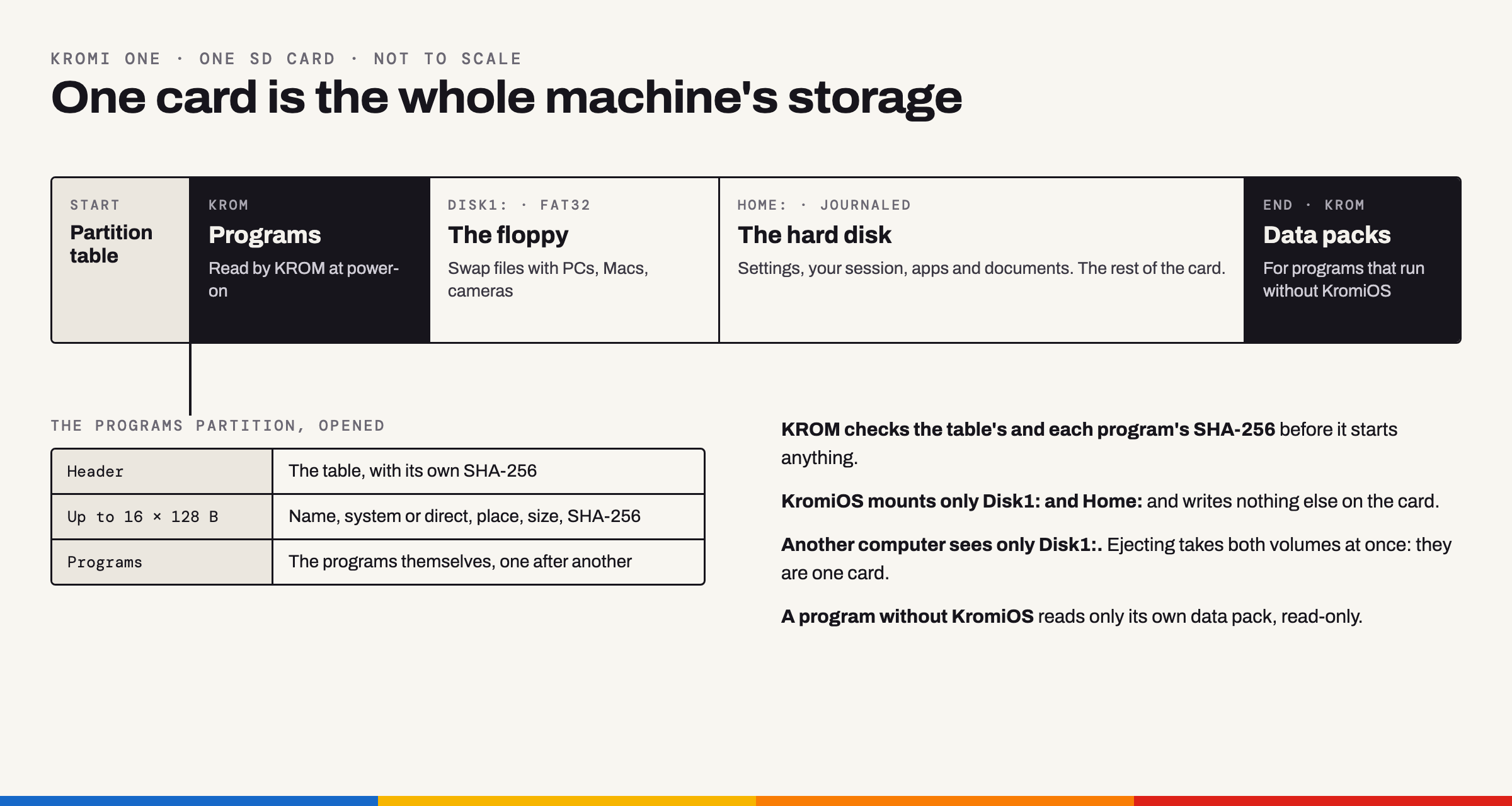 Not to scale. Home: takes most of the card.
A tour of the card
Start at the beginning and walk to the end.
The partition table comes first. It’s the signpost that tells everybody what’s where.
Programs is KROM’s own corner, and KromiOS never looks inside. It’s a list of up to 16 programs. Each entry says what the program is called, whether it’s a system like KromiOS or a direct program like a game, where it sits on the card, how big it is, and carries its SHA-256 fingerprint. Before KROM starts anything from here, it checks the list’s fingerprint and then the program’s own.
Disk1: is the floppy. It’s formatted FAT32, so any PC, Mac or camera can read and write it, and it’s the only part of the card another computer ever sees. We keep it modest on purpose. It’s for passing files around, not for living in.
Home: is the hard disk, and KromiOS’s own space. Your settings live there, your apps, your documents, and your session: the windows KromiOS puts back where they were when it starts again. It takes up the rest of the card and has no limit on file size.
Home: is built so that a save can’t go half wrong. KromiOS writes the new version next to the old one and then swaps them in a single step, so a file is always either the old version or the new one, never half of each. To check, we pulled the power at every single write of a change, nearly a thousand times in simulation. Every time, Home: came back either as it was before the save or as it was after it. The tests on the real board come before Home: holds anybody’s real data.
Data packs sit at the far end of the card. They belong to programs that run without KromiOS, such as a game. KROM starts the game from the card, and the game can read its own pack, read-only, and nothing else on the card.
The sound of a floppy
Because the card is our floppy, it should sound like one. When the card goes in, you hear the latch click. The motor spins up, the head steps and seeks while the card is busy, the motor winds down, and when you eject there’s the button, the pop and the disk sliding out.
The whole chain, from insert to eject. This is the sound set Kromi One plays, rendered on a computer; it isn’t a capture from the board.
The sounds are our own, and a homage to the Amiga 500. Sergej recorded the drive of his own Amiga 500, and we resynthesised its sound, so they’re new sounds with no sample of the recording in them. Several short loops of the drive at work play in random order for as long as the card is busy, so it never sounds like a looped recording. KROM, the firmware, plays them and mixes them quietly under whatever sound a program makes, and Settings can switch them off. Home: lives on the same card, so saving there sounds just like saving to Disk1:.
They have already played on the real board, where Sergej heard them while the machine read the real card. At that first listen KromiOS’s older disk sounds were playing too, so every card access sounded twice and out of step. Those old ones are gone now, and KromiOS uses KROM’s sounds and the Settings switch for them. A proper listening session with just the new set is still to come.
What it does today
KROM starts from the board’s own flash, then starts KromiOS from the card, the same path the board takes at power-on. Nothing is loaded from a computer. “Starting KromiOS” shows for three seconds, and a key stops it.
A test build of KROM has also started a direct program from the card: Kromylist, our port of a two-player tactics game. It read its 16.1 MB pack from its own read-only partition and drew 5,395 pictures of its battles, and every one matched the reference exactly.
KromiOS touches only Disk1: and Home:, and writes nothing else on the card. Both live on the same card, so ejecting takes both volumes at once. And if you pull the card while KromiOS is saving, it doesn’t panic, it just asks you to put it back. All of this is so far in the emulator and on the Mac; Home: on the real board waits for its first sitting.
What’s planned
- A menu at power-on when the card holds several programs, and a way back to it when a program ends.
- A larger table for big cards with many programs. The KV260 reads SDXC cards up to 2 TB; so far we’ve used a 128 GB card.
Why one card
Because one card is one thing to back up, one thing to swap and one thing to hand to a friend. Put in your own card, and your desktop comes back the way you left it. And once the menu is there, a card with a game on it will be all a friend needs to play.