
Underneath Kromi One
The roadmap on the home page shows the way to Kromi One itself. This page shows the work underneath it, step by step: what is done, what we build now and what follows. It shows the order, not dates.
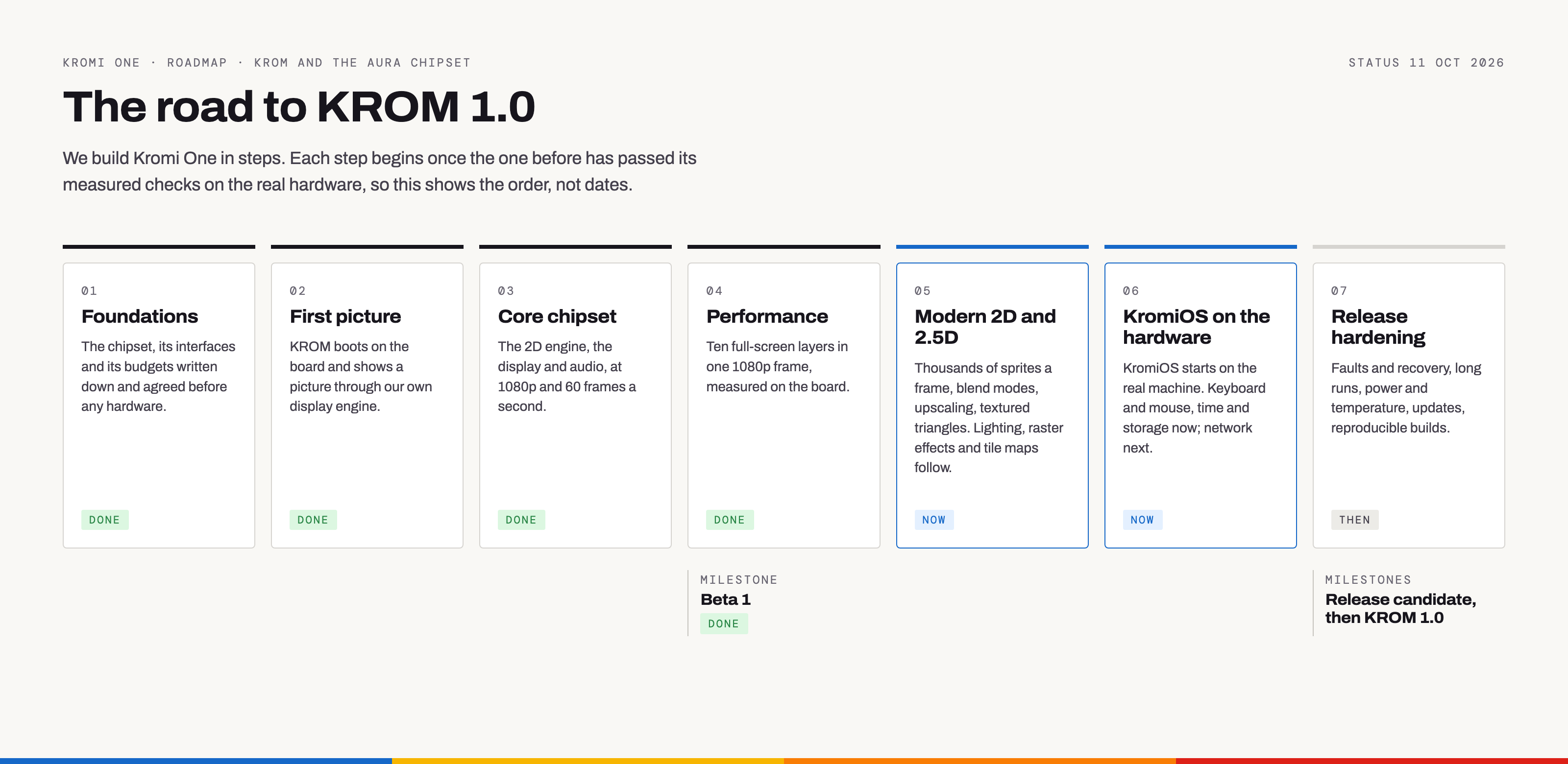
The road to KROM 1.0
We build Kromi One in steps. Each step begins once the one before has passed its measured checks on the real hardware, so this shows the order, not dates.
- 01Foundations
The chipset, its interfaces and its budgets written down and agreed before any hardware.
Done - 02First picture
KROM boots on the board and shows a picture through our own display engine.
Done - 03Core chipset
The 2D engine, the display and audio, at 1080p and 60 frames a second.
Done - 04Performance
Ten full-screen layers in one 1080p frame, measured on the board.
DoneMilestone · reachedBeta 1 - 05Modern 2D and 2.5D
Thousands of sprites a frame, blend modes, upscaling, textured triangles, tile maps and lines. Lighting and raster effects follow.
Now - 06KromiOS on the hardware
KromiOS starts on the real machine. Keyboard, mouse, the time of day, SD-card storage and the network work for programs.
Now - 07Release hardening
Faults and recovery, long runs, power and temperature, updates, reproducible builds.
ThenMilestonesRelease candidate, then KROM 1.0
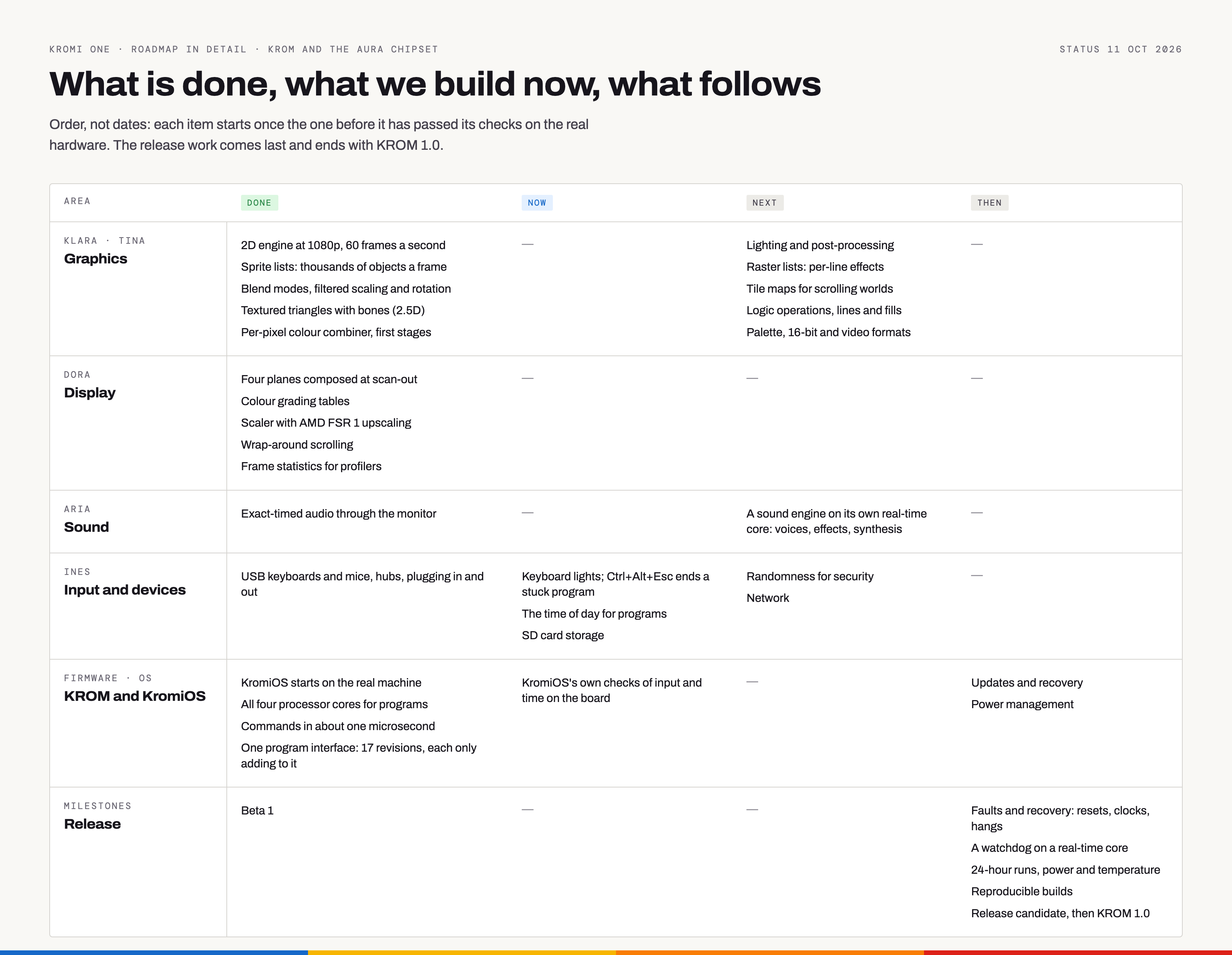
What is done, what we build now, what follows
Each item starts once the one before it has passed its checks on the real hardware. The release work comes last and ends with KROM 1.0.
- 2D engine at 1080p, 60 frames a second
- Sprite lists: thousands of objects a frame
- Blend modes, filtered scaling and rotation
- Textured triangles with bones (2.5D)
- Per-pixel colour combiner, first stages
- Tile maps for scrolling worlds
- Thick, smooth lines
- Lighting and post-processing
- Raster lists: per-line effects
- Logic operations and fills
- Palette, 16-bit and video formats
- Four planes composed at scan-out
- Colour grading tables
- Scaler with AMD FSR 1 upscaling
- Wrap-around scrolling
- Frame statistics for profilers
- Exact-timed audio through the monitor
- A sound engine on its own real-time core: voices, effects, synthesis
- USB keyboards and mice, hubs, plugging in and out
- Keyboard lights; Ctrl+Alt+Esc ends a stuck program
- The time of day for programs
- SD card storage
- Randomness for security
- The network: Ethernet for programs
- Which keyboard or mouse each input came from
- KromiOS starts on the real machine
- All four processor cores for programs
- Commands in about one microsecond
- One program interface: 21 revisions, each only adding to it
- KromiOS's own checks of input and time on the board
- Updates and recovery
- Power management
- Beta 1
- Faults and recovery: resets, clocks, hangs
- A watchdog on a real-time core
- 24-hour runs, power and temperature
- Reproducible builds
- Release candidate, then KROM 1.0
As pictures, for articles and posts (PNG, 3200 px wide): Overview, light · Overview, dark · In detail
The road to KromiOS's first release
KromiOS is built in steps too, on top of KROM. Each part is built and checked in the emulator first. Everything up to step 04 has run on the real machine since KromiOS first started there; step 05 adds keyboard, mouse, the time and storage. This shows the order, not dates.
- 01Foundations
The architecture, the screens and the requests to KROM, written down and agreed before any code.
Done - 02The first slice
A desktop with text and vector icons, Lua apps with limits, and the same picture in the emulator and on the Mac.
Done - 03A small working system
Tasks and messages, files in memory, windows, a start-up script, and apps that only do what they may.
Done - 04The Terminal
The Terminal's first version at 1920 × 1080: commands, scripts, a Lua console, tabs, history, copy and find.
Done - 05KromiOS on the hardware
KromiOS starts on the real machine. Keyboard, mouse, keyboard layouts and the time work; storage on the SD card now.
Now - 06Apps you can rely on
When an app hangs you see it and can end it; apps ask before they reach further; every change can be undone.
Done - 07Studio 1
Studio, the Lua editor, in its first version: write, run and fix apps on the machine itself.
DoneMilestone · reachedStudio 1 - 08The desktop in motion
All four cores at work, the interface on its own; windows and the pointer as hardware planes, smooth at 60 frames a second.
Then - 09Files that stay
Your files on the SD card; Files, Text and Settings that save; a clock; your session kept across a restart.
Then - 10The network
The network with secure connections, the App Center's catalogue, and later Mail.
Then - 11An installable product
Installed from an SD card onto the machine; updates; switching off and on.
ThenMilestoneFirst release
What is done, what we build now, what follows
Each item starts once what it needs is in place. The first release comes last: KromiOS installed from an SD card, with updates.
- Every screen designed first, on one canvas
- Text and vector icons drawn by the chipset
- Windows you can drag, resize, stack and minimise
- A dark theme
- Native 1920 × 1080
- The interface on its own processor core
- Windows and the pointer as hardware planes
- Settings that are kept, and a clock in the menu bar
- Commands with templates, wildcards and aliases
- Shell scripts, Lua scripts and a Lua console
- Tabs, history, editing and completion
- Scrolling, copying and finding in the output
- Studio's editor: undo, find and highlighting
- Trial runs with Stop, the console and errors at their line
- Files
- Text
- Slides and Sheets
- The App Center's catalogue
- Lua apps, each with its own memory and time limits
- Apps that only do what their permissions allow
- The names apps use, settled for good
- When an app hangs: see it, wait or end it
- Apps ask before they reach further
- Undo and redo for every document
- The architecture and its key decisions
- Handing the machine to a game and getting it back
- Tasks and messages between apps
- Files and folders in memory, with assigns
- A start-up script
- A session written down and brought back
- The trash and the clipboard
- Room for apps: 16 MB each, more memory as needed
- Apps hear what changed: files, the clipboard, settings
- The time of day
- Storage on the SD card
- The network, with secure connections
- Home and Disk 1 on the SD card
- Your session kept across a restart
- Updates and recovery
- Switching off and restarting
- US and German keyboard layouts
- USB keyboards and mice
- Keyboard lights, and the key that ends a stuck game
- Fonts from a disk
- What KromiOS needs from KROM, asked for in batches
- KromiOS starts on the real machine
- Up to date with KROM's interface
- Installing from an SD card
- Checks that can fail, and the same bytes in the emulator and on the Mac