
The chords that weren't chords
For thirty years, tracker musicians faked their chords. Kromi One is getting a tracker of its own, the music tool of the Amiga and the demo scene, and the first thing it learned was to play a real chord in a single cell.
Put on almost any piece of computer music from the early 1990s and listen closely to the chords. They don’t sound like a piano or a guitar. They shimmer and buzz, as if the notes were rubbing against each other.
That’s because they aren’t chords at all.
The programs those songs were written in could play only one note per channel, and there were very few channels. So musicians cheated. Instead of playing C, E and G together, they played C, then E, then G, then C again, switching fifty times a second. Your ear can’t follow that fast, so it hears something close to a chord, with a buzz on top. That trick, the arpeggio, became the signature sound of a whole era of computer music.
Kromi One is getting a music program in that tradition: a tracker. And the first thing we made sure it could do is the thing those old programs couldn’t. It plays a real chord, written in a single cell. This post is about why we want a tracker at all, what kept so many people away from the old ones, and the first piece of music our engine played, which I didn’t like.
What a tracker looks like
If you’ve never seen one, a tracker looks roughly like this:
Row   Channel 1      Channel 2      Channel 3      Channel 4
 00   C-4  01  047   C-2  02  ...   C-3  03  ...   ---  ..  ...
 01   ---  ..  ...   ---  ..  ...   ---  ..  ...   ---  ..  ...
 02   ---  ..  ...   C-2  02  ...   ---  ..  ...   F#4  04  ...
 03   ---  ..  ...   ---  ..  ...   ---  ..  ...   ---  ..  ...
 04   G-3  01  037   G-1  02  ...   D-3  03  ...   ---  ..  ...
Time runs from top to bottom. Each row is a short moment, each column is one channel, and each channel plays one sound at a time. C-4 01 means “play the note C in octave 4 with instrument 1”. Press play and the rows scroll upwards past a fixed line while the machine plays them, like film credits running in a loop.
The last three characters are the effect. Look at 047 in the first row. The 0 means arpeggio, and the 4 and 7 mean “also flick 4 and 7 semitones up”. Four semitones above C is E, seven is G. That little code is the fake C major chord from the start of this post. Two rows further down, 037 does the same for a minor chord.
It looks like a spreadsheet, and in a way it is one. But it’s also a complete recording studio that fits on a floppy disk.
The bedroom studio
The first tracker, Ultimate Soundtracker, came out for the Amiga in 1987. The Amiga had a sound chip that could play four sampled sounds at once, and Soundtracker gave each of them a column. You loaded a few short recordings, a kick drum, a bass, a stab of strings, and typed your song into the grid.
The songs it saved, the “MOD” files, were tiny, and they spread everywhere: on floppy disks swapped in school yards, through dial-up bulletin boards, inside the demos that the demo scene made to show off what a machine could do. ProTracker followed on the Amiga, then Scream Tracker and FastTracker 2 on the PC in the mid-1990s, with more channels and better sound.
What made trackers special wasn’t only the sound. It was that you could see everything. Download someone’s song, open it, and there it was: every note, every drum hit, every trick. Want to know how they made that bass line bounce? Scroll down and read it. A whole generation taught itself music this way, in their bedrooms, by taking apart other people’s songs, and plenty of them had never had a music lesson. Some went on to write music for games.
Why Kromi One needs one
Kromi One is a home computer with its own simple operating system, KromiOS, built for games, for work, and for anyone who likes to understand their machine. That last part matters most here.
A tracker is the most honest music program there is. Nothing hides behind a plug-in or a menu. A song is a grid you can read, and the machine does exactly what the grid says. That’s the same idea Kromi One is built on: a computer you can look inside.
There’s a practical reason too. Games written for Kromi One will need music, and the people writing them shouldn’t have to leave the machine to make it. And making a song out of nothing is simply one of the most fun things you can do with a computer.
Why so many people gave up
If trackers were so great, why don’t more people use them? Open one today and you’ll see.
Every effect works like that arpeggio: a letter or digit and two numbers, and you’re expected to know them by heart. 4 plus two numbers is a vibrato, with its speed and depth. E9 plus a number retriggers a note, the stutter you hear in drum fills. There are dozens of them. Beginners opened a tracker, saw a wall of codes, and closed it again.
(In our tracker those codes are still there for anyone who wants them. Everyone else picks an effect from a list of plain names, such as Arpeggio, Slide up, Glide to note and Vibrato, and the grid shows the old 047 as “Arp 4 7”.)
Then there are the chords. Later trackers had many more channels, so you could stop faking chords with arpeggios, but each channel still played one note. A real four-note chord meant typing it across four columns. A soft pad holding chords under a melody could use up half your channels before you’d written a single melody note. Music theory thinks in chords like Am7 and Fmaj7. Trackers made you think in channels.
The tracker we want
So we started from a simple question. What would a tracker look like if it kept the grid, kept the honesty, and threw away the parts that scare people off?
Here’s the start of the chorus of Synth-pop, one of the four demo songs that come with our tracker. Each cell holds a note, an instrument, a volume and, if there is one, an effect:
Row Pad Pluck Lead Bass
1 ≡A-3 01 24 A-4 03 26 E-5 04 34 ······· A-1 02 44
2 ··· ·· ·· C-5 03 18 ··· ·· ·· ······· ··· ·· ··
3 ··· ·· ·· E-5 03 18 ··· ·· ·· Vib 3 4 A-2 02 34
4 ··· ·· ·· A-5 03 18 ··· ·· ·· Vib 3 4 ··· ·· ··
5 ··· ·· ·· E-5 03 26 A-5 04 34 ······· A-1 02 44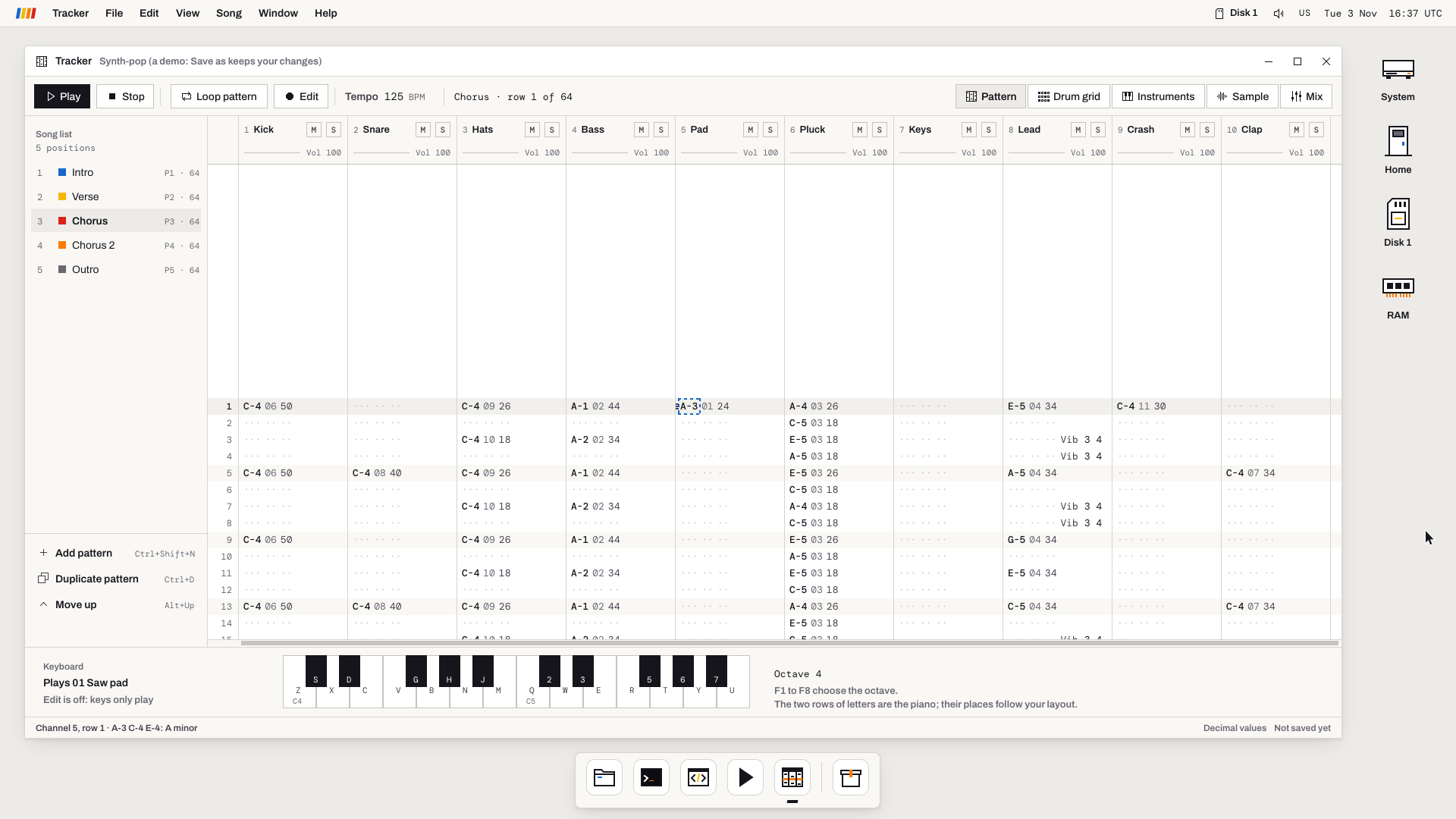 Tracker on KromiOS, playing the Synth-pop demo. In the Pad column, the single cell A-3, marked with a small stack of bars, holds the whole A minor chord, and the status bar names it: “A-3 C-4 E-4: A minor”. Next to it, the Pluck column plays the same chord the old way, one note per row. (Screenshot from the KromiOS emulator, QEMU.)
A chord is a chord. Look at the Pad column: one cell, A-3, with a little stack of bars beside it (drawn here as ≡), one bar for each note. That cell holds the whole A minor chord, and one channel plays all of it. Put the cursor on it, and the bar along the bottom of the screen reads “A-3 C-4 E-4: A minor”. Right next to it, the Pluck column plays the same chord the old way, one note per row, up and down. Both are in the same song, and you can use whichever you like.
Effects have short names you can read. The “Vib 3 4” in the Lead column is a vibrato, and the status bar spells it out: “Vibrato: speed 3, depth 4”.
Your keyboard is the piano
How do you get a chord into a cell? You play it. The bottom row of letters, Z to M, is one octave, and the row from Q upwards is the next, the same layout trackers have always used. Press Z and you write a C. Now hold Z down and press C and B as well. All three notes go into the same cell, and the status bar says “C major”. You don’t need to know what the chord is called. Your fingers find it, and the tracker tells you its name.
Beats without codes
If you’ve never written a beat, open the drum grid with Ctrl+2. Every instrument gets a lane and every step is a box: click a box in the kick’s lane and the kick plays there, click it again and it’s gone. How tall the box is shows how hard it’s played. A beat in the drum grid and the notes in the pattern aren’t two separate things. They’re the same song seen two ways. Tick a step, switch back to the pattern, and the note is there in its column.
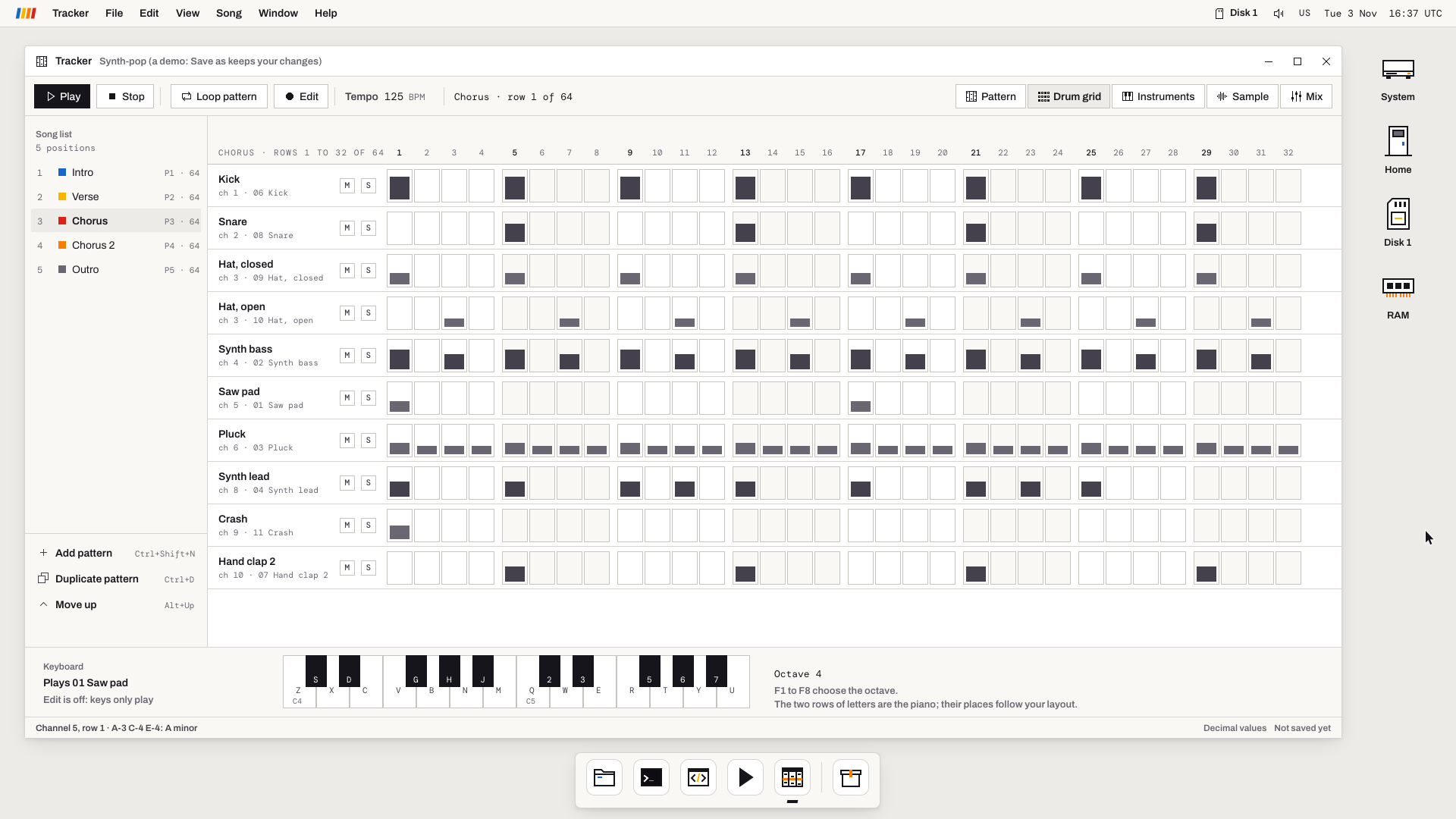 The same chorus in the drum grid: every instrument gets a lane and every step a box, and a box’s height shows how hard it is played. Kick on every beat, snare and clap on two and four. (Screenshot from the KromiOS emulator, QEMU.)
Sounds from the start
You never start with silence, either. Press Ctrl+3 and the instrument library opens with more than a hundred sounds, sorted by kind: drums, bass, keys, strings, brass and more. Some are KromiOS’s own sounds, made by the system itself; the others are real recordings of pianos, strings, brass and drums that anyone may use freely. Move with the arrow keys, press Space to hear a sound, and Enter puts it in your song.
None of the old power goes away. If you want to type codes and squeeze every trick out of the machine, you still can.
The first piece, and why I didn’t like it
Before any of that could exist, the engine had to work: the part of the program that reads a song and turns it into sound. When it played its first piece of music, I listened and wasn’t happy.
It sounded like 1990. Thin beeps, buzzing arpeggios, the whole chip-music kit. My verdict was “very old school”. I wanted something more melodic, not an 8-bit sound. Nostalgia is nice, but a new machine shouldn’t sound like it’s apologising for itself.
The engine wasn’t to blame. That first piece was a test, built from the smallest possible sounds, a tiny wave repeated over and over, exactly how the earliest computer music was made. Its chords were already real, one cell each. Only the instruments had to change. So the second attempt got richer ones, still generated by code with no recordings involved.
It’s 40 seconds long, in A minor, at a calm 84 beats a minute. A wide pad breathes underneath, three slightly detuned voices on each side, so it sounds warm rather than electronic. An electric piano plays over it, each of its overtones fading at its own pace the way a real one does. There’s a plucked bass and soft drums. The chords move from Am7 to Fmaj7 to Cmaj7 and G, then turn through Dm7 and E7, with the bass gliding into the E7, before everything comes home to A minor. On top sits a melody with a gentle vibrato on its long notes, and an echo answers it three rows later from the other side of the stereo picture.
Every one of those pad chords sits in a single cell, with no arpeggio in sight. This time my verdict was: “Much better.”
That was only the beginning. Since then the tracker has learned to play real recorded instruments, and its songs have grown up. This is Ballad, the song that starts playing the first time you open the app: piano, strings, flute and glockenspiel, with reverb, written in the tracker and played by the same engine.
Ballad, one of the four demo songs that come with the tracker, rendered by its engine.
Respecting the old songs
There’s one promise we want to keep to everyone who was there in the 1990s. Thousands of songs were written in FastTracker 2. When you open one of them on Kromi One, it should sound exactly the way its author heard it back then, buzzing arpeggios and all.
So instead of inventing our own rules for how a song is played, we built the engine on FastTracker 2’s, with the help of ft2-clone, Olav Sørensen’s lovingly faithful open-source recreation of it. That meant respecting its oddities too. Slide a note far beyond its normal range in FastTracker 2 and it wraps around to strange, unexpected pitches. Our engine simply went quiet instead. We changed it to do the strange thing, because somewhere out there is a song that depends on it.
What’s next
The engine didn’t stay on its own for long. It already lives inside KromiOS, with the first version of the app around it.
The first time you open Tracker, you don’t get an empty grid. A ballad starts playing straight away. Press Space to stop it, and a short guide walks you through the rest in six small steps: playing the keyboard like a piano, ticking a step in the drum grid, picking a sound from the library, adding a pattern and saving your song. Under File > Open demo there are four finished songs to open and take apart: a ballad, drum and bass, a cinematic piece and synth-pop. The next post in this series is about the app.
Still ahead: hearing a sound the moment you point at it in the library, and notes that keep sounding for as long as you hold the key. And in part three, the sound itself: the real instruments, and those four songs to listen to.
And if you wrote MODs in your bedroom in the nineties, I’d love to hear about it. What was the first song you took apart to see how it worked?